Integration · WhatsApp Business Platform
WhatsApp Business API integration, connected to the rest of your business.
We integrate the WhatsApp Business Platform (the official API) with your CRM, website and internal tools: conversations shared across the team, replies and follow-ups automated within WhatsApp’s rules, and every message kept on the customer record.
WhatsApp conversations owned by the business, visible in the CRM and acted on automatically.
You’ll recognise this
- Customer chats live on staff phones and leave with them.
- Several people share one WhatsApp app login on one device.
- Nothing that happens on WhatsApp reaches the CRM.
- Templates were rejected and nobody knows why.
Built and run in-house
-

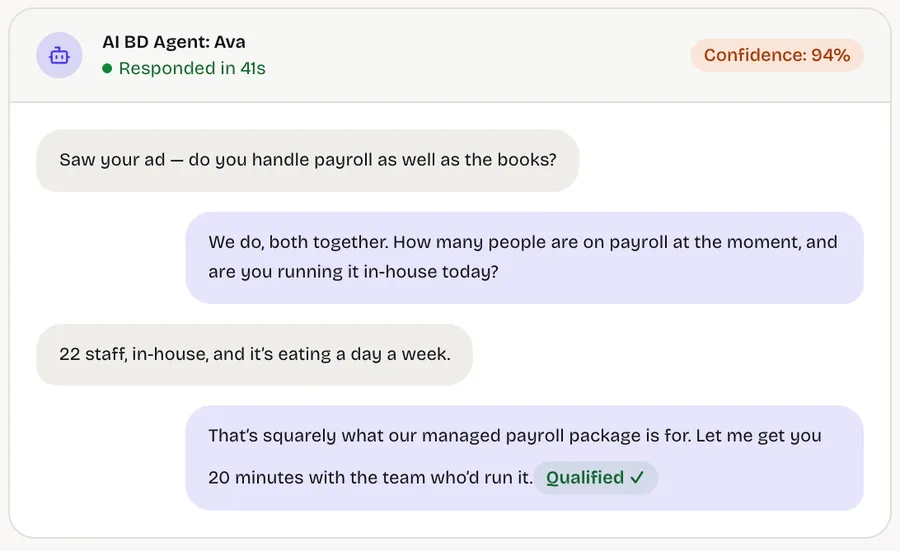
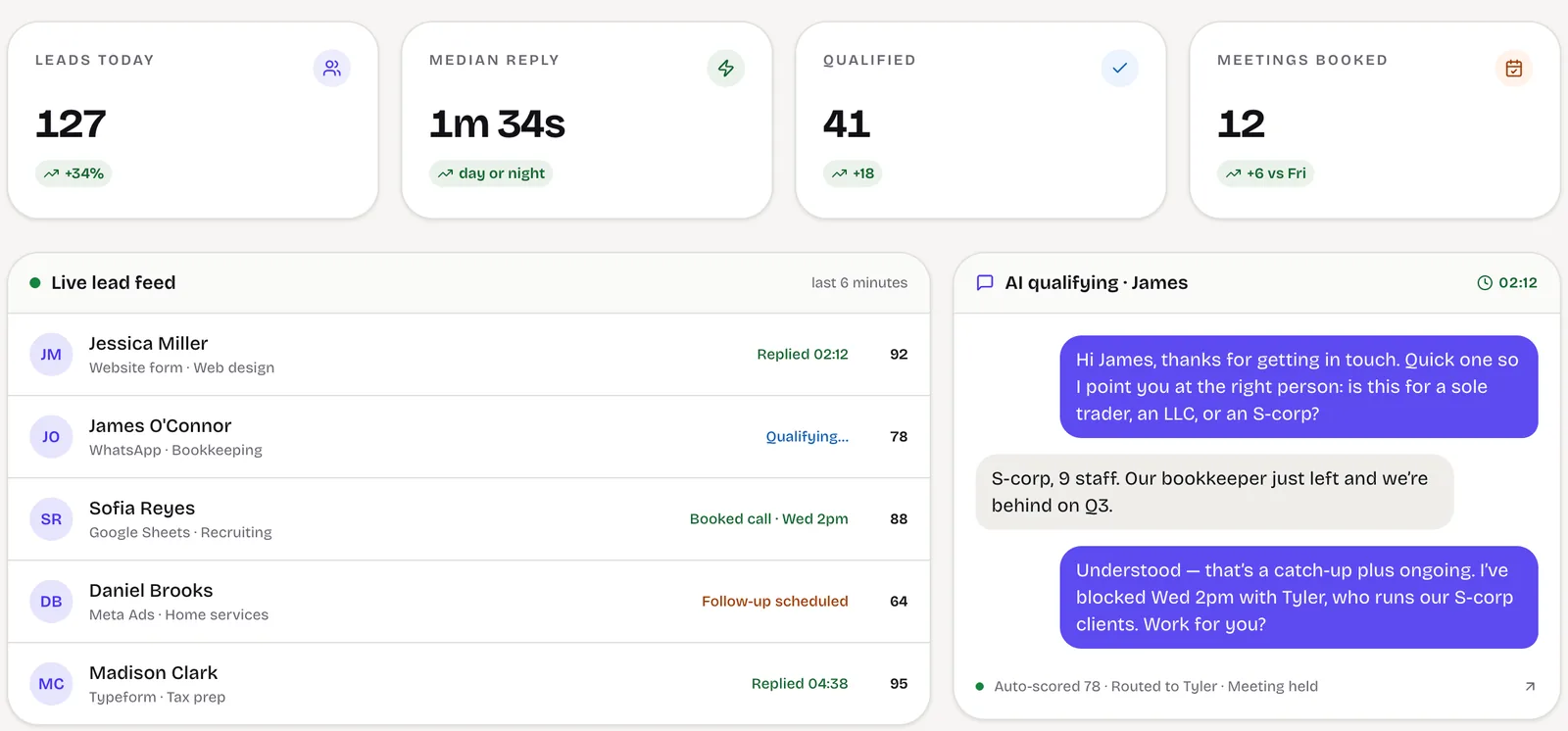
LeadSpidey · AI SDR for inbound leads
Answers and qualifies inbound leads on WhatsApp and email, then books the meeting with the transcript attached.
The business problem
The WhatsApp app was built for a person. Your business isn’t one.
The WhatsApp Business app works well for a shop owner answering customers by hand. It stops working when several people need the same conversations, when messages should trigger work elsewhere, or when the business needs a record of what was said.
The WhatsApp Business Platform solves that, but it is an API, not an app. It needs a Meta business account, a verified number, approved message templates, a webhook to receive messages and software to send them, plus handling for its rules on when and how businesses can message people.
We build that layer: the connection to Meta, the inbox your team uses, the automation that runs on top and the sync that puts every conversation in your CRM.
What we build
What the integration includes.
-
Platform setup
Business verification guidance, phone number registration and display name, on your own Meta business account.
-
Shared team inbox
Conversations assigned to people, with notes, handover and history, in your CRM or a custom inbox.
-
Automated replies
Instant acknowledgements, qualifying questions and routing, written in your voice.
-
Template management
Message templates written to pass review, submitted, versioned and used for follow-ups and notifications.
-
Two-way CRM sync
Contacts, conversations and outcomes synced with your CRM; CRM events can trigger WhatsApp messages.
-
Notifications
Booking confirmations, payment reminders and status updates sent by your systems through approved templates.
How it works
How messages move.
-
01
Message received
Meta delivers the customer’s message to our webhook in real time, with media and the referral ad where present.
-
02
Matched and logged
The sender is matched to a CRM contact or created as a new lead, and the message logged on the record.
-
03
Automated or assigned
Rules or an AI agent reply where they should; otherwise the conversation is assigned to a person.
-
04
Replies and templates
Replies go out freely within the 24-hour window, and approved templates are used outside it.
What moves between systems
- Inbound messages
- Text, images, documents, location and button replies, with the click-to-WhatsApp ad that started the chat when there is one.
- Contacts and conversations
- Phone number, profile name, conversation history and assignment, written to the CRM contact or lead.
- Delivery statuses
- Sent, delivered, read and failed statuses for every outbound message, stored against it.
- Events from your systems
- CRM stage changes, bookings or payments that trigger template messages to the customer.
Errors, permissions and failures
- Failed sends surfaced
- Messages that fail, for example outside the 24-hour window or to an invalid number, are flagged to the owner instead of disappearing.
- Opt-outs respected
- Customers who ask to stop are marked and excluded from templates and sequences automatically.
- Least-privilege access
- System users and tokens with only the permissions the integration needs, held in your Meta business account.
- Webhook monitoring
- Incoming message delivery is monitored, with alerts if Meta stops reaching the integration.
Build, buy or connect
Cloud API, a provider, or the app.
How a business can get onto WhatsApp, and when each route fits.
-
The WhatsApp Business app
Best when: one person on one phone
No API, no automation and no CRM sync; conversations live on the device.
-
A business solution provider
Best when: you want a ready-made inbox and support plan
A provider hosts the connection and adds its own inbox and fees; your data sits in its platform.
-
Meta’s Cloud API, built for you
Best when: WhatsApp must work inside your own systems
We build on the Cloud API in your Meta account, so the number, data and integration stay yours.
Who it is for
For businesses where WhatsApp is a real sales or service channel.
A good fit when
- More than one person needs to answer WhatsApp conversations.
- You want WhatsApp conversations recorded in your CRM.
- Your systems should send customers updates on WhatsApp automatically.
- You run click-to-WhatsApp ads and want them attributed.
Probably not when
- One person answers a few chats a day on the WhatsApp app.
- You want to send marketing broadcasts to people who haven’t opted in.
- An off-the-shelf WhatsApp inbox product already meets your needs.
-
Founder-led B2B service firms
Founders of B2B service businesses whose sales and delivery have outgrown the founder’s inbox.
Measured on: Pipeline, win rate and revenue per employee
What changes: A pipeline that answers, qualifies and follows up on its own, and a business that can grow without adding headcount at the same rate.
-
Ops, sales & growth leaders
Heads of operations, sales or marketing inside mid-size companies, with a mandate and no spare engineering team.
Measured on: Cost to serve, cycle time and cost per acquisition
What changes: The system your team needs, delivered alongside IT rather than queued behind it, with security and ownership handled properly.
Project process
Discovery, build, launch, then better.
Phases, not promises. Each step is decided on what the previous one showed.
-
01
Week 1
Account and number
Meta business account, number and display name prepared, and the first templates drafted.
-
02
Weeks 2–3
Inbox and CRM sync
Messages flowing into the inbox and CRM, with assignment and history.
-
03
Weeks 3–6
Automation
Automated replies, routing, follow-ups and system notifications added.
-
04
Ongoing
Monitored and maintained
Templates, rules and API changes kept up to date as Meta updates the platform.
Works with
- WhatsApp Business Platform
- WhatsApp Cloud API
- Meta Business Manager
- Click-to-WhatsApp ads
- HubSpot
- Zoho CRM
- Pipedrive
- Custom CRMs
- Google Sheets
- Slack
Cost and engagement
What decides the cost.
Every engagement starts with a short, fixed scoping sprint that ends in a written scope, so you know what the first build takes before you commit to it.
- The number of WhatsApp numbers, brands and teams.
- Whether the inbox lives in your CRM or is built as a custom tool.
- The automation on top: rules, AI replies, follow-ups, notifications.
- The systems that send or receive WhatsApp events.
- Meta’s own conversation charges, billed to your account by Meta.
-
01
Scoping sprint
A short, fixed piece of work to map one workflow and decide what is worth building.
-
02
Build
The first workflow designed, built and released, then extended in small, scoped steps.
-
03
Run & improve
An ongoing engagement to keep the system running, measured and getting better.
Questions
Questions about WhatsApp integration.
What is the difference between the WhatsApp Business app and the API?
Do you use a WhatsApp business solution provider?
Why do templates get rejected?
Can we migrate our existing number?
Who pays for WhatsApp messages?
How long does WhatsApp Business API approval take?
Start a project
Connect WhatsApp to your systems.
Tell us how you use WhatsApp today, how many people answer it and which CRM you use. A partner replies within one business day.
Make WhatsApp part of your systems, not a phone in a drawer.
A short scoping sprint, a written scope, and a plain answer on whether building is worth it.
Or write to us at [email protected]