AI automation agency
AI automation agency services, built by a team that runs its own AI products.
Looking for an AI automation agency? Scribbify builds the AI agents and automations that answer leads, support customers, run outreach, draft documents and keep your tools in step. We build them in your accounts, with people approving what matters, and we run AI products of our own, so we know what it takes to keep them working.
AI that does the work, people who approve what matters.
AI automation is one part of what we build as a software development company. See everything we build to scale revenue.
01 What you are hiring for
What an AI automation agency should build.
Not a chatbot bolted onto your website. Agents and automations that do real work inside the tools your business runs on, and that you can trust to keep doing it.
Agents that do the work
AI that reads a message, a document or a record, decides what it means and takes the next step: replies, qualifies, drafts or routes.Automations that move the work
Rules that pass information between your tools on time, every time: follow-ups, handoffs, approvals, updates and reports.Systems you own
Both built in your accounts, joined to your CRM and documented, so the automation keeps working and keeps being yours.
In your business
Three situations owners tell us about.
-
Scenario 01
Two hours of replies before real work
Say your team starts every day answering routine emails and WhatsApp messages: prices, availability, “did you get my file?”.
With it in place: An AI agent drafts or sends those replies from your own information, and the team’s morning goes to clients who need a person.
-
Scenario 02
Leads that arrive while you sleep
Say a third of your enquiries come in the evening or at weekends, and by the time anyone replies, the buyer has moved on.
With it in place: An AI SDR answers in minutes, asks your questions and books qualified leads into your calendar overnight.
-
Scenario 03
The proposal that takes an evening
Say each new enquiry means a senior person spends an evening turning notes into a proposal.
With it in place: An agent produces the first draft in your format from the brief, and your senior person finishes it in half an hour.
02 Our AI automation capabilities
Nine things we automate with AI.
Built alone or together, each in your tools and measured on the revenue or hours it moves. The examples are illustrative.
-
01
AI SDR for inbound leads
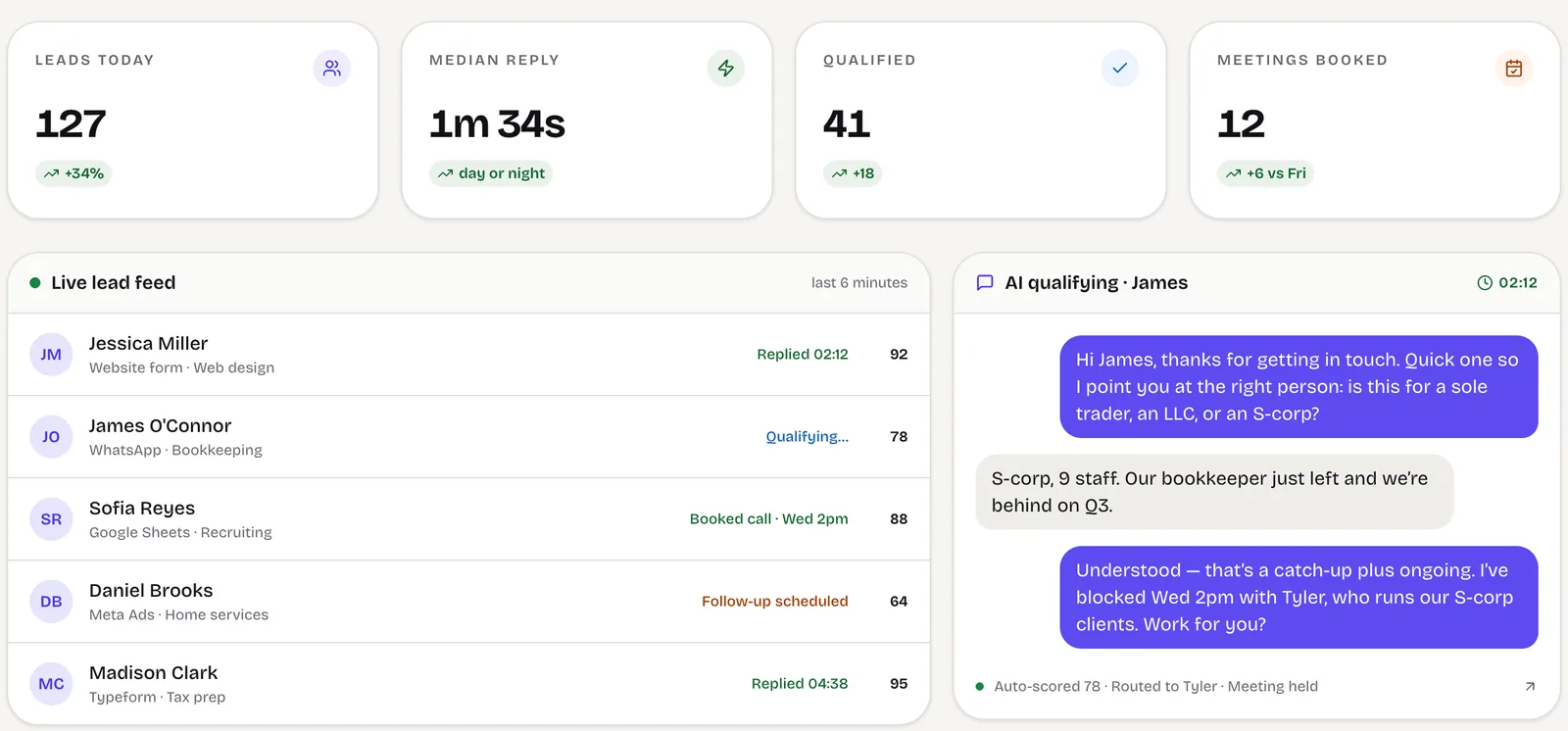
Answers every enquiry in minutes on WhatsApp, email or chat, asks your qualifying questions, scores the lead and books the meeting.
For example: A lead from a Meta form at 11pm is answered, qualified and booked before morning.
How we build it -
02
AI customer support agents
Answers customer questions from your own help content and order data, logs every ticket and hands sensitive cases to a person.
For example: A “where is my order?” question is answered with the live status; a refund request goes to the team.
How we build it -
03
Outreach automation
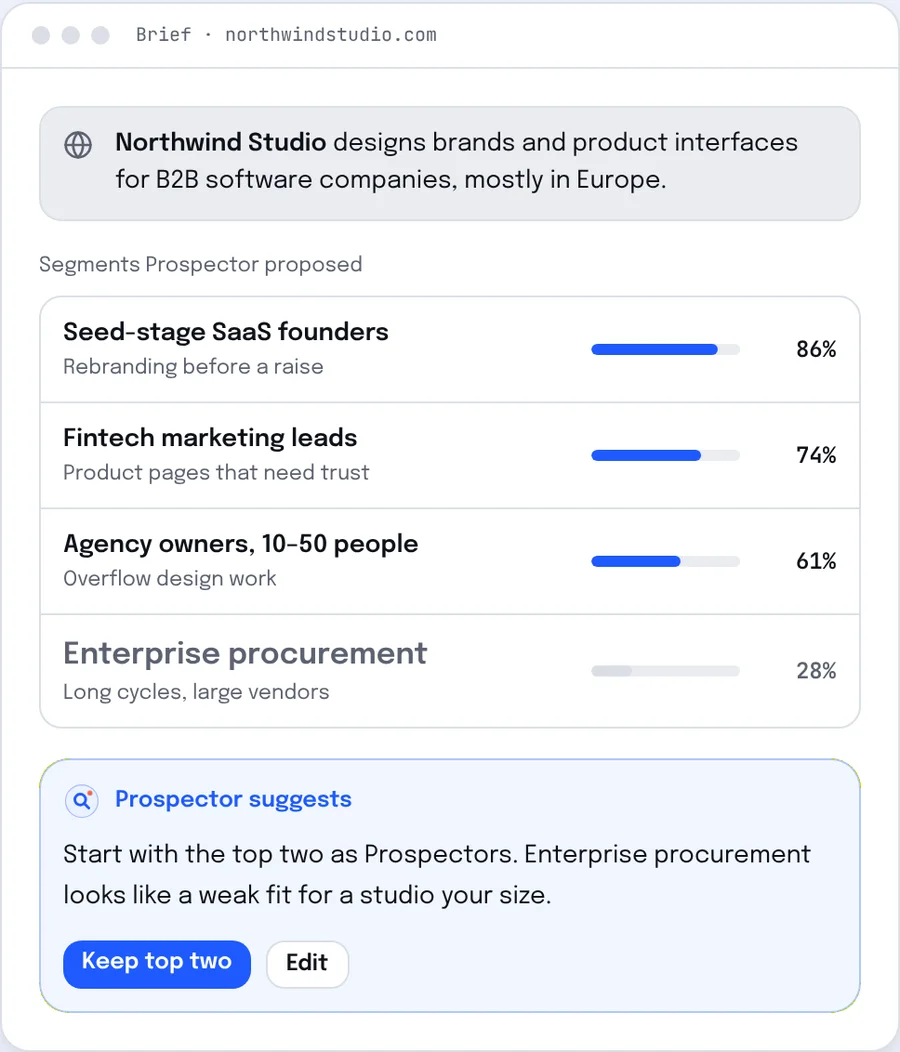
Email and LinkedIn sequences with research per account, stop rules on reply and interested replies routed to your team.
For example: A reply asking for a call creates a CRM record and alerts the account owner.
How we build it -
04
Lead follow-up automation
Follow-up across email and WhatsApp that branches on what each lead does and stops the moment they reply.
For example: A quote unopened after three days triggers a short WhatsApp nudge, then a task for sales.
How we build it -
05
WhatsApp automation
The official WhatsApp Business Platform joined to your CRM: instant replies, approved templates and every chat on the record.
For example: A click-to-WhatsApp ad enquiry is answered, tagged with its campaign and assigned to an owner.
How we build it -
06
Document drafting and extraction
AI that reads incoming documents and emails, pulls out the fields you need and drafts proposals, summaries and replies for review.
For example: A brief arriving by email becomes a draft proposal waiting for a partner’s approval.
How we build it -
07
Workflow and back-office automation
Onboarding, approvals, data entry and handoffs automated across the tools you keep, with exceptions sent to an owner.
For example: A won deal creates the client record, the project and the onboarding checklist without a briefing email.
How we build it -
08
Reporting and AI summaries
Numbers pulled live from your CRM, ads and accounts, with plain-language summaries of what changed and why.
For example: Monday’s pipeline report builds itself, with a short note on which channel moved.
How we build it -
09
AI search visibility
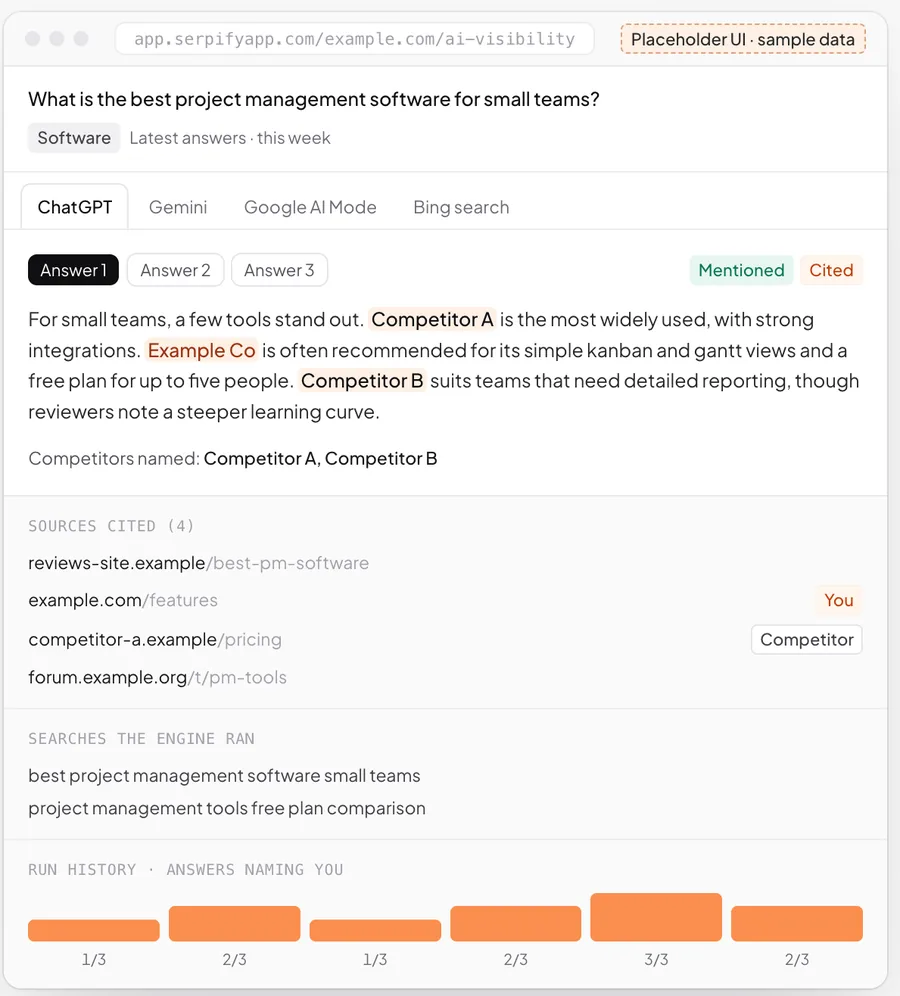
Tracking and structure that show whether ChatGPT, Gemini and Google AI Mode name your business, and help them to.
For example: A weekly check of the prompts your buyers ask, with where you were named and cited.
How we build it
03 For service agencies
What we can build for an agency, and how each one grows revenue.
Marketing, creative, recruitment and consulting agencies make money in four places: winning clients, closing deals, keeping and growing accounts, and serving more clients per person. These are illustrative builds for each, and the revenue each one moves.
-
Win new clients
An AI SDR for discovery-call enquiries
Answers enquiries from your website, LinkedIn and WhatsApp in minutes, asks about budget, scope and timing, and books qualified prospects straight into a discovery call.
How it grows revenue: More of the enquiries you already pay to attract become discovery calls, before a competitor replies.
-
Win new clients
Outbound to lookalikes of your best clients
Builds lists of companies that look like your best-paying clients, drafts a personal first line from their public activity, and runs email and LinkedIn steps that stop on reply.
How it grows revenue: New pipeline that doesn’t depend on referrals, aimed at the kind of client with your best margins.
-
Close more deals
Proposal drafts from the discovery call
Turns call notes or the transcript into a proposal and scope in your template the same day, ready for the account lead to check and send.
How it grows revenue: Proposals land while the buyer is still keen, instead of a week later, so more of them close.
-
Close more deals
Follow-up on unsigned proposals
Follows up on quiet proposals with useful nudges, answers common questions from your own material and tells the account lead the moment a buyer replies.
How it grows revenue: Fewer proposals lost to silence, and every warm reply in front of a person within minutes.
-
Keep clients longer
An early warning for at-risk clients
Watches the signs that come before churn, such as slipping results, slow replies, missed approvals and late payments, and flags the account to its lead with a suggested next step.
How it grows revenue: Retainers saved weeks before notice is given, instead of discovered at renewal.
-
Grow existing clients
A scope-creep and upsell spotter
Reads client requests, flags work that falls outside the retainer and drafts a change order, and notices when a client is ready for another of your services.
How it grows revenue: Extra work gets billed instead of done for free, and existing clients grow into bigger accounts.
-
Serve more clients per head
Client reports with AI summaries
Builds monthly reports from ad, analytics and CRM data, with a plain-language summary of what changed drafted for the account manager to review.
How it grows revenue: Each account manager can look after more clients, so revenue grows faster than headcount.
-
Get paid sooner
Onboarding and invoicing on autopilot
On signature: the kick-off checklist, access requests, the project set-up and the first invoice, then polite payment reminders until it is paid.
How it grows revenue: Work starts sooner, the first invoice goes out on day one, and cash comes in faster.
04 How an AI agent runs
From trigger to logged result, with the exceptions handled.
Every agent we build follows the same path, and every step has a rule for when things don’t go to plan.
-
01
Trigger
A message, form, email, document or schedule starts the work.
Duplicates are matched to the existing record first.
-
02
Context
The agent reads the record, the history and the approved sources it may use.
No approved source for the question? It says so rather than guessing.
-
03
Decide
It works out what is being asked and the next step under your rules.
Unsure or outside its limits: it hands over.
-
04
Act
It replies, updates the CRM, drafts a document or books a meeting.
Anything consequential waits for a person to approve.
-
05
Log and report
Every step is recorded for review and counted in reporting.
A failed connection is retried and the owner alerted.
05 How we start
One automation first, in real use, then the next.
Phases, not promises: each step is decided on what the last one showed.
-
01
Weeks 1–2
Scope one automation
Pick the workflow that costs most, map it with the people who do it, and agree the limits and the measure.
-
02
Weeks 3–6
Supervised in real use
The first agent or automation runs on real work with a person reviewing it, and is tuned before it runs unattended.
-
03
Ongoing
Widen and add
More channels, more autonomy and the next automation, each added once the last has proved itself.
06 Built in-house
We run AI automation on our own business first.
LeadSpidey is an AI SDR for inbound leads, Prospektify finds leads and runs LinkedIn and email outreach, and Serpify tracks AI visibility. The same controls go into what we build for you.



07 Controls
AI you can leave running.
An automation is only useful if you can trust it on a busy day. These controls are designed before the first answer is written.
Approved sources only
Agents answer from the content and data you approve, and show where each answer came from.Written limits
What an agent may say, promise and do is set in writing, with topics that always go to a person.Human approval
Quotes, refunds, commitments and anything unusual wait for a person before they happen.Logged and reviewable
Every conversation and action is recorded, so you can check what happened and why.A pause switch
Any agent or automation can be paused at once, with work falling back to your team.Your accounts, your data
Built in accounts you own, with providers and settings that don’t train on your data.
08 Build it yourself or have it built
When a no-code tool is enough.
Plenty of automation needs no outside help. If yours is short and stable, a tool such as Zapier, Make or n8n is the cheaper answer, and we will say so.
Models and tools we choose between
- OpenAI
- Anthropic Claude
- Google Gemini
- n8n
- Make
- Zapier
- WhatsApp Business Platform
- Gmail
- Outlook
- HubSpot
- Zoho CRM
- Pipedrive
- Slack
- Google Sheets
- Calendly
| Question | Do-it-yourself tools | Scribbify build |
|---|---|---|
| Best for | Short, standard steps between two tools | Workflows across several tools, with your data and rules |
| AI judgement | A prompt with few controls around it | Approved sources, limits, approvals and review built in |
| When something fails | Often found when a customer complains | Monitored and logged, retried, with the owner alerted |
| Who looks after it | Whoever set it up, when they have time | Documented, run with you or handed to your team |
| Right when | The workflow is short and rarely changes | The workflow costs revenue when it breaks |
09 Is this for you
When AI automation pays its way.
AI automation works best on frequent, patterned work with a clear owner. These are the signs it will, and the signs it won’t.
A good fit when
- A team spends hours a week on replies, data entry or reports that follow a pattern.
- Leads or customer questions wait because nobody is free to answer.
- You use a CRM or can start one, and the tools you rely on have APIs.
- Someone on your side can review the agent’s work for the first weeks.
Probably not when
- The work changes every time and depends on judgement no rule can describe.
- You want AI to make commitments to customers with nobody checking.
- There is no record of the work yet: no CRM, inbox or shared files.
- A ready-made tool already does the job well enough.
10 Questions
Before you hire for AI automation.
What does an AI automation agency do?
Is Scribbify an AI automation agency?
Which AI models do you use?
Do you build on n8n, Make or Zapier?
How do you stop an AI agent from making mistakes?
How long does the first automation take?
What does AI automation cost?
Is our data used to train AI models?
Plan your first AI automation
Tell us the work you want off your team’s plate.
Name the replies, data entry or reports that eat the week. A partner replies within one business day, and the first call ends with which automation to build first and how it would be measured.
- A partner reads every enquiry
- A 45-minute working call
- A written scope you can decide on
Or write to us at [email protected]
AI agents & automation