United Kingdom
Bespoke software development for UK professional services, from CRMs to client portals.
Professional services run on casework, not on a sales pipeline. We build bespoke CRMs, client portals and workflow automation for UK professional services firms: accountants, consultancies, recruiters, agencies and advisory practices whose real work starts after the client signs.
Client work, documents and approvals in one system, with less chasing and fewer email chains.
You’ll recognise this
- Client documents arrive by email attachment and get saved in three places.
- Partners ask for a status update and someone has to go and find out.
- Your practice software handles the core work but not onboarding or follow-up.
- You are unsure where client data sits and who can see it.
01 The business problem
The work after the sale is where the margin goes.
Off-the-shelf CRMs are built to win deals. UK professional services firms usually win their work through referrals and relationships; what costs them is everything after: onboarding, collecting documents, chasing approvals, keeping clients updated and making sure nothing slips at a deadline.
That work tends to run on email, shared drives and the memory of a few senior people. It scales badly, it is hard to delegate and it leaves client data spread across inboxes, which makes questions about access and retention uncomfortable to answer.
A bespoke CRM and client portal turns that casework into a visible process: each client and engagement in one record, documents requested and received in one place, approvals logged, and data handled the way you decided it should be.
-
Lever 01
Faster onboarding
Engagement letters, ID and documents collected through a portal, so work and billing start sooner.Moves: Time to first invoice -
Lever 02
Partner time protected
Status, chasing and admin handled by the system, so senior time goes on advice clients pay for.Moves: Revenue per fee earner -
Lever 03
Retention by design
Clients see progress without asking, and recurring work is scheduled before they have to remind you.Moves: Client retention
02 In your business
What this looks like on an ordinary week.
Three situations owners tell us about, and what changes once this is in place.
-
Scenario 01
Client documents by email
Say your practice collects IDs, engagement letters and files by email attachment, and the team spends hours matching them to the right client.
With it in place: Clients upload securely into a portal, documents land on the right record, and the team sees what is still missing.
-
Scenario 02
Casework on sticky notes
Say each matter has steps, deadlines and approvals that live in people’s heads and notebooks. When someone is on holiday, work stalls.
With it in place: Every matter follows your steps in a system the whole team can see, with reminders before anything is due.
-
Scenario 03
“Where are we with my case?”
Say clients ring to ask for updates because they can’t see progress, and each call interrupts a fee earner.
With it in place: Clients see progress and next steps in the portal, so the calls drop and fee earners keep billing.
03 How UK firms work
What we design for in the UK.
The patterns behind UK professional services builds. Your own practice decides the detail.
- 01
Casework, not deals
Records are built around clients, engagements, deadlines and documents, so the system matches how fee earners actually work. - 02
Data handling agreed up front
Where data is hosted, who can access what and how long records are kept are design decisions we settle with you, with UK GDPR in mind and your advisers making the legal calls. - 03
Practice software stays
Accounting, practice management and e-signature tools usually stay in place; we connect to them rather than replace them. - 04
Clients who expect a portal
Clients increasingly expect to upload, approve and check progress themselves, on a secure login rather than by email.
04 Who it is for
For UK firms whose clients deserve better than email.
A good fit when
- You collect documents and approvals from clients on every engagement.
- Your team relies on email and shared drives to know where work stands.
- You want clear answers on where client data is and who can see it.
- Your practice software is fine at its job but leaves gaps around it.
Probably not when
- You need a certified or accredited supplier for regulatory reasons.
- Your practice management software already covers onboarding and portals well.
- You need an on-site team in the UK.
-
Agency & consultancy owners
You run an agency or consultancy with many clients at once, and your margin disappears into reporting, onboarding and status updates.
You watch: Margin per client, team hours and client retention
What changes: Reports and onboarding that run on their own, more clients per account manager, and new business that doesn’t wait for referrals.
-
Owners of local & consumer service businesses
You run a travel agency, clinic, real estate brokerage, training business or similar, where customers arrive on WhatsApp, calls and ads, often out of hours.
You watch: Enquiries answered, bookings and repeat customers
What changes: Every enquiry answered in minutes, quotes followed up until customers decide, and a team that spends its day on the customers in front of it.
05 What we build
Bespoke systems for client work.
Bespoke CRM
Clients, contacts, engagements and deadlines in one record, with views for partners, managers and administrators.Client portal
A secure login where clients upload documents, sign, approve and see progress, branded as your firm.Onboarding automation
Engagement letters, checks and document requests sent, chased and filed automatically as each client is taken on.Deadline and recurring work
Recurring obligations scheduled per client, with reminders to the team and to the client before anything is late.Roles and audit trail
Permissions by role and client, with a log of who viewed, changed or approved what.Practice reporting
Work in progress, capacity, overdue items and revenue per client, without building a spreadsheet each month.
06 How it works
From engagement letter to delivered work.
- Step 01
Client onboarded
Engagement letter signed and checks completed through the portal, with the record created automatically. - Step 02
Documents collected
Requests sent with a checklist; clients upload securely and reminders go out until it is complete. - Step 03
Work tracked
Tasks, deadlines and approvals moving through stages your team defined, visible to partners at a glance. - Step 04
Delivered and scheduled
The client approves, the work is filed and the next recurring engagement is already in the diary.
- Client enquiries
- Documents and e-signature
- Ledger tools
- Recurring work
Bespoke CRM and client portal
Built for one business, owned by it
- Onboarding on rails
- Deadlines owned
- Roles and audit trail
- Practice reporting
07 Project process
Discovery, build, launch, then better.
Phases, not promises. Each step is decided on what the previous one showed.
-
01
Weeks 1–2
Practice workflow and data
Map an engagement end to end and agree what data is held, where and by whom.
-
02
Weeks 3–8
CRM core and onboarding
Client records and onboarding automation live for new clients first.
-
03
Weeks 8–14
Client portal
Uploads, approvals and progress opened to clients, starting with a small group.
-
04
Ongoing
Recurring work and reports
Deadlines, reminders and practice reporting added as the core settles.
Works with
- Xero
- QuickBooks
- Microsoft 365
- SharePoint
- Google Workspace
- DocuSign
- Dropbox Sign
- GoCardless
- Stripe
- Slack
08 Proof
Built and run in-house first.
We run the same kind of system on our own business before we build it for anyone else.
-

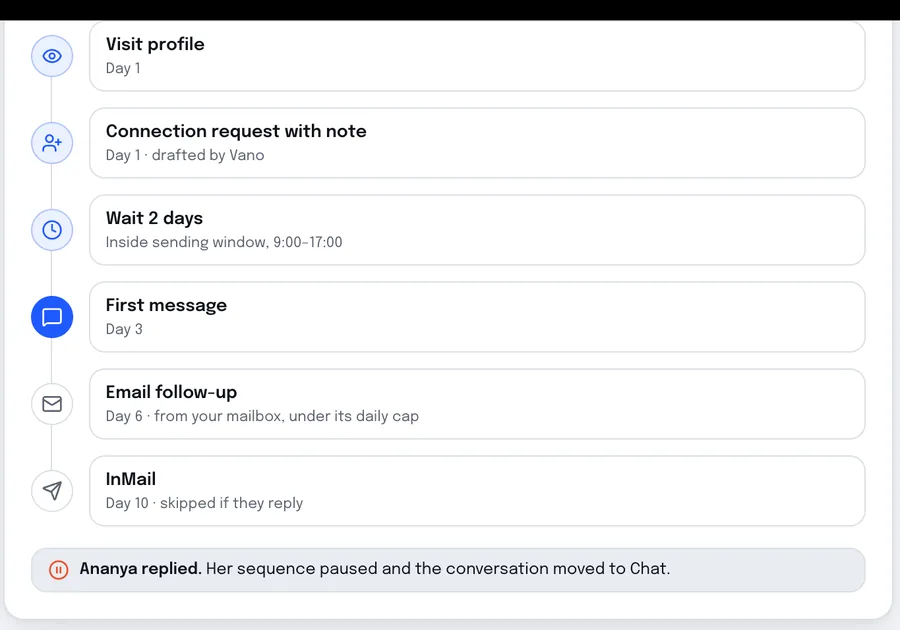
Prosvano · LinkedIn automation
Pipeline, a shared reply inbox and approval before anything is sent: the building blocks of a bespoke CRM.
09 Cost and engagement
What decides the cost.
Every engagement starts with a short, fixed scoping sprint that ends in a written scope, so you know what the first build takes before you commit to it.
- The number of service lines and the engagement stages each one needs.
- Whether a client portal is in scope, and what clients can do in it.
- Connections to practice, accounting and e-signature tools.
- Roles, permissions and the audit trail you need.
- Migrating client records from spreadsheets or a previous system.
10 Build, buy or connect
Off-the-shelf, configured, or bespoke.
The honest comparison for a UK professional services firm.
-
An off-the-shelf CRM
Best when: you mostly need a sales pipeline
HubSpot, Salesforce or Zoho handle leads and deals well, priced per seat, with casework left to other tools.
-
Practice software, extended
Best when: your practice platform fits most of the work
Keep it, and add the onboarding, portal or reporting it lacks around it.
-
A bespoke CRM and portal
Best when: casework, documents and approvals are the business
Clients, matters, deadlines and a branded portal in one system your firm owns, connected to Xero, Sage and the rest.
11 Questions
Questions from UK firms.
Do you build for UK firms?
What about UK GDPR?
Where will our data be hosted?
Can the portal carry our branding?
Do we need to replace our practice management software?
Is a bespoke CRM worth it compared with HubSpot or Salesforce?
What drives the cost of a bespoke CRM?
Talk to us about your practice
Give your clients a portal and your partners their time back.
Tell us how a typical engagement runs today and where it slows down. A partner replies within one business day.
- A partner reads every enquiry
- A 45-minute working call
- A written scope you can decide on
Or write to us at [email protected]
All markets